
KDS for
Kitchen Flow

Real-time kitchen orders, station routing, timers, and completion flow from one live display.

Lucky POS KDS replaces paper tickets with a clear digital command center for POS, Kiosk, QR ordering, printers, and service teams.

Core Features

Built to keep kitchen teams aligned when orders move fast

01

Real-Time Order Sync

Orders from POS, Kiosk, QR ordering, and tablet ordering appear on kitchen screens instantly.

  • Second-level updates
  • Orders from POS, Kiosk, QR ordering, and tablet ordering appear on kitchen screens instantly.
  • Works with the same live POS, QR ordering, and printer workflow
02

Station-Based Display

Hot dishes, cold dishes, drinks, desserts, and prep stations can each see only the items they need.

  • Clear kitchen zones
  • Hot dishes, cold dishes, drinks, desserts, and prep stations can each see only the items they need.
  • Works with the same live POS, QR ordering, and printer workflow
03

Workflow Stage Routing

Move orders through preparation stages so cooks, expediters, and service teams share one status view.

  • Pending, preparing, ready
  • Move orders through preparation stages so cooks, expediters, and service teams share one status view.
  • Works with the same live POS, QR ordering, and printer workflow
04

Order & Dish Modes

Switch between full order cards and item-focused views to match different kitchen habits.

  • Flexible kitchen views
  • Switch between full order cards and item-focused views to match different kitchen habits.
  • Works with the same live POS, QR ordering, and printer workflow
05

Complete & Print Ticket

Mark items complete and print service tickets with table, order, and pickup details when needed.

  • One-tap handoff
  • Mark items complete and print service tickets with table, order, and pickup details when needed.
  • Works with the same live POS, QR ordering, and printer workflow
06

Audio & Visual Alerts

New orders, rush items, and overdue tasks can trigger highlights and sound reminders.

  • Reduce missed orders
  • New orders, rush items, and overdue tasks can trigger highlights and sound reminders.
  • Works with the same live POS, QR ordering, and printer workflow

Kitchen Order Flow

From order received to dish served

KDS gives every kitchen station a shared source of truth, so order status can move forward without repeated verbal checks.

01

Order Received

New items arrive from POS, Kiosk, QR ordering, or tablet ordering.

02

Route by Station

Items are assigned to hot kitchen, cold kitchen, drinks, dessert, or expo.

03

Prepare with Timer

Preparation time, rush status, and notes stay visible on screen.

04

Complete Item

Cooks mark dishes complete and update the order status.

05

Serve or Print

The system supports service tickets, pickup flow, and front-of-house handoff.

Kitchen Hardware & Workflow Support

Designed for real kitchen scenes: connect touch displays, POS channels, printers, and every kitchen station into one clear workflow.

Touch Display Support

Works with any touchscreen monitor from 15" kitchen-grade displays to large 32" wall-mounted panels. IP-rated options available for steamy environments.

Multi-Screen Sync

One kitchen, multiple screens - all connected to the same order queue. Add as many station displays as you need without any configuration headaches.

Full POS Ecosystem Integration

Seamlessly connects with Front Desk POS, Self-Service Kiosk, and QR Ordering. Orders from every channel land in the same queue, managed from one system.

Print Trigger Integration

Automatically fires print jobs at the pass-through or serving station the moment a dish is marked complete. Customizable ticket formats for different service flows.
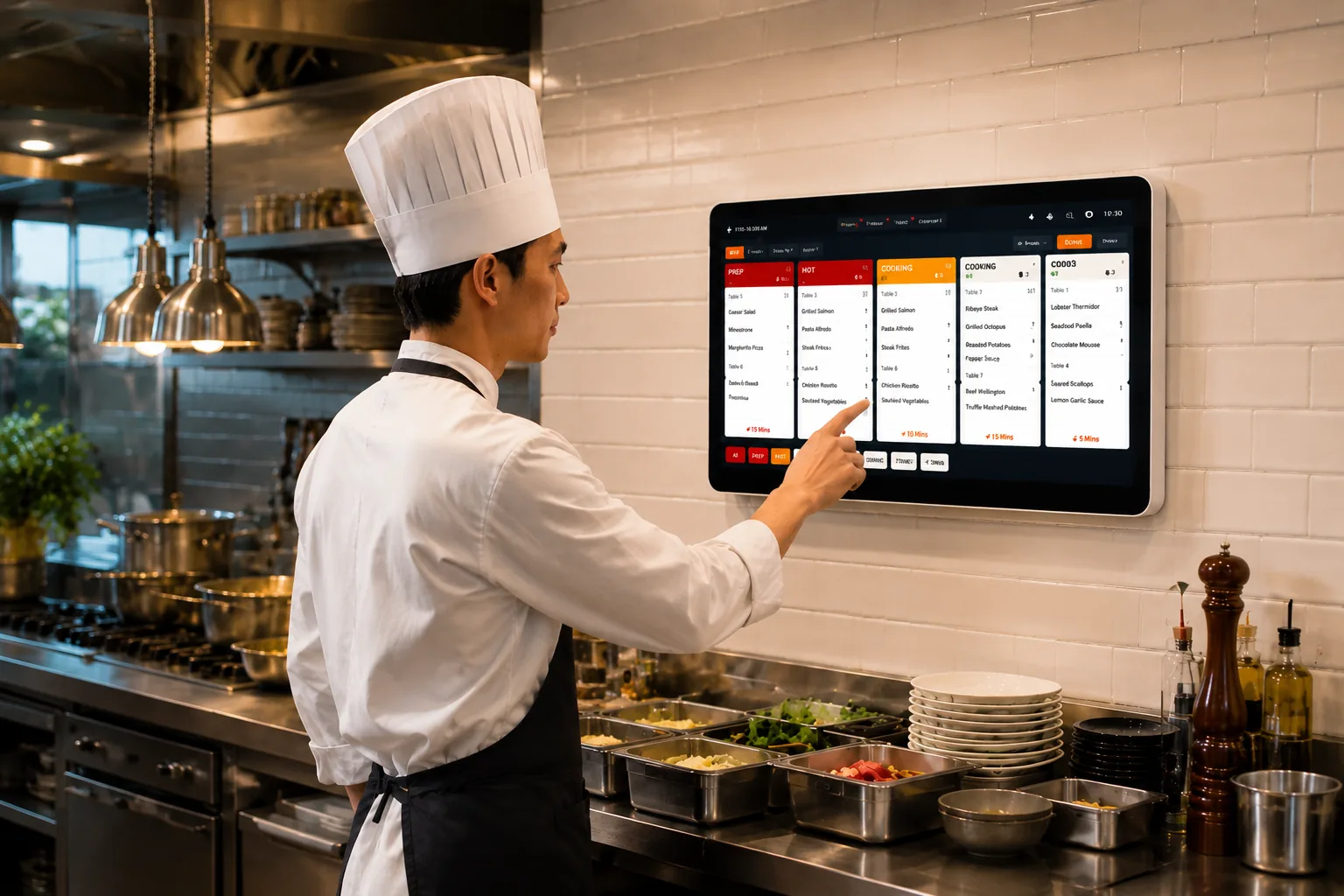
KDS kitchen display hardware setup

Where It Fits

KDS adapts to different kitchen structures and service pressure

Best Fit

Dine-In Kitchens

Route table orders, notes, and add-on dishes to the right station without paper ticket confusion.

01

Dine-In Kitchens

Route table orders, notes, and add-on dishes to the right station without paper ticket confusion.

  • Table service
  • Add dishes
  • Kitchen notes
02

Quick Service

Keep fast-moving order queues visible with pickup numbers, timers, and rush labels.

  • High volume
  • Pickup flow
  • Fast handoff
03

Multi-Station Stores

Separate hot dishes, drinks, desserts, and expo work while keeping status synchronized.

  • Stations
  • Prep routing
  • Shared status

Business Value

Visible gains when kitchen teams work from one real-time order screen

30%

Faster kitchen throughput

40%

Fewer rush-hour complaints

0.1%

Missed-order risk target

24/7

Live order visibility

We Have the Answers

Common questions about KDS setup, station routing, kitchen printers, and order sync

Yes. KDS is designed to receive confirmed orders from supported Lucky POS ordering channels and keep the kitchen workflow connected.